Every organization depends on digital systems, even when technology is not its primary business. Email, cloud applications, payment platforms, customer databases, employee devices, remote access, and third-party services all create value, but they also create exposure. Effective cybersecurity solutions protect that value by reducing the likelihood of an incident and limiting the damage when an incident occurs.
Security cannot be solved by buying one tool. A firewall cannot compensate for stolen credentials. Antivirus cannot restore encrypted data when backups fail. Employee training cannot fix an unpatched internet-facing system. Strong protection comes from coordinated controls across people, processes, and technology.
A practical security program should cover the full risk lifecycle. The NIST Cybersecurity Framework 2.0 organizes outcomes into six functions, Govern, Identify, Protect, Detect, Respond, and Recover. This provides a useful structure for selecting and improving security controls.
This guide explains the cybersecurity solutions every organization should consider, from governance and asset inventory to identity security, endpoint protection, backups, threat detection, incident response, vendor risk, employee awareness, and continuous testing.
Why Organizations Need Layered Cybersecurity Solutions
Attackers do not need to defeat every defense. They only need one useful weakness.
Common entry points include:
- Stolen passwords
- Phishing messages
- Unpatched software
- Misconfigured cloud services
- Exposed remote access
- Infected devices
- Excessive user permissions
- Compromised suppliers
- Unmonitored accounts
- Poorly protected backups
A layered strategy assumes that one preventive control may fail. Other controls should still detect the activity, restrict movement, protect critical data, and support recovery.
The objective is not perfect security. It is managed risk, resilient operations, and fast recovery.
1. Cybersecurity Governance and Risk Management
Security begins with ownership.
Essential Governance Components
Organizations need:
- An accountable executive
- Defined security responsibilities
- Approved policies
- Risk assessments
- A security budget
- Metrics and reporting
- Exception management
- Regulatory and contractual tracking
- A review schedule
Why Governance Matters
Security tools often fail when nobody owns configuration, maintenance, investigation, or improvement.
Governance connects cybersecurity to:
- Business priorities
- Legal obligations
- Customer commitments
- Operational resilience
- Financial risk
- Reputation
Practical Starting Point
Create a cybersecurity steering group that includes technology, legal, operations, finance, human resources, communications, and business leadership.
Security is an organizational risk, not only an IT responsibility.
2. Asset Inventory and Attack-Surface Management
An organization cannot protect systems it does not know exist.
Inventory Should Cover
- Laptops and desktops
- Servers
- Mobile devices
- Network equipment
- Cloud accounts
- SaaS applications
- Websites and domains
- Databases
- APIs
- Operational technology
- Internet of Things devices
- Third-party connections
- Service accounts
Record Important Details
For every asset, document:
- Owner
- Business purpose
- Location
- Operating system
- Software version
- Data classification
- Internet exposure
- Criticality
- Support status
Attack-Surface Monitoring
External attack-surface tools identify exposed systems, forgotten subdomains, expired certificates, open services, and unmanaged cloud resources.
Asset inventory supports nearly every other cybersecurity solution, including patching, monitoring, access control, and incident response.
3. Identity and Access Management
Identity has become a primary security boundary because employees access systems from many locations and devices.
Core Identity Controls
- Centralized identity provider
- Single sign-on
- Multifactor authentication
- Role-based access
- Privileged access management
- Automated account provisioning
- Rapid deprovisioning
- Access reviews
- Conditional access
- Strong service-account controls
Use Phishing-Resistant Authentication
Where practical, use passkeys, hardware security keys, or certificate-based authentication for administrators and high-risk users.
Traditional text-message codes can be better than passwords alone, but stronger methods offer more protection against interception and social engineering.
Apply Least Privilege
Employees should receive the minimum access needed for their role.
Review access after:
- Role changes
- Department transfers
- Contractor completion
- Extended leave
- Employment termination
CISA identifies multifactor authentication and strong password management among foundational protections organizations should implement.
4. Privileged Access Management
Administrator accounts can change systems, access sensitive data, and disable controls.
Privileged Access Solutions Should Provide
- Separate administrator accounts
- Password vaulting
- Just-in-time access
- Session recording
- Approval workflows
- Command monitoring
- Credential rotation
- Emergency access procedures
Important Practice
Administrators should not use privileged accounts for routine email, browsing, or office work.
Reducing permanent administrative access limits the damage from compromised credentials.
5. Endpoint Detection and Response
Every laptop, desktop, and server is a potential entry point.
Endpoint Security Should Include
- Malware prevention
- Behavioral detection
- Isolation capability
- Host firewall
- Disk encryption
- Device control
- Application control
- Central policy management
- Security telemetry
- Investigation tools
EDR Versus Traditional Antivirus
Traditional antivirus focuses heavily on known malicious files.
Endpoint detection and response also observes behavior, such as:
- Unusual script execution
- Credential dumping
- Suspicious process chains
- Ransomware activity
- Persistence mechanisms
- Lateral movement
Mobile Device Management
Organizations should also manage phones and tablets with:
- Screen-lock policies
- Encryption
- Application controls
- Remote wipe
- Device compliance
- Operating-system requirements
6. Email Security and Phishing Protection
Email remains a major route for credential theft, malware, fraud, and impersonation.
Also Read: What Is Cybersecurity? Complete Beginner’s Guide
Essential Email Controls
- Spam and malware filtering
- Link analysis
- Attachment sandboxing
- Domain authentication
- Impersonation detection
- External sender labels
- Account-takeover monitoring
- User reporting button
- Payment-change verification
Configure Email Authentication
Organizations should correctly implement:
- SPF
- DKIM
- DMARC
These controls help receiving systems verify whether messages are authorized to use the organization’s domain.
Protect Financial Processes
Require independent verification for:
- Bank-account changes
- Urgent transfers
- Payroll changes
- Supplier payment updates
- Executive requests involving money or sensitive data
7. Vulnerability and Patch Management
Known vulnerabilities become more dangerous when attackers actively exploit them.
A Complete Program Includes
- Automated vulnerability scanning
- Asset-based prioritization
- Patch testing
- Deployment deadlines
- Exception approval
- Internet-facing asset review
- Unsupported software removal
- Remediation verification
- Executive reporting
Prioritize by Risk
Do not rely only on numerical severity.
Consider:
- Active exploitation
- Internet exposure
- Asset criticality
- Available privileges
- Data sensitivity
- Compensating controls
Patch Operational Discipline
Define targets such as:
- Critical actively exploited vulnerabilities: emergency response
- Critical internet-facing vulnerabilities: accelerated remediation
- Standard operating-system and application updates: scheduled cycles
CISA maintains vulnerability response playbooks for vulnerabilities actively exploited in the wild, reinforcing the importance of prioritized remediation.
8. Secure Configuration and Hardening
Default configurations often prioritize convenience rather than security.
Hardening Should Address
- Unnecessary services
- Default accounts
- Weak protocols
- Open ports
- Insecure remote access
- Logging
- Encryption
- Browser settings
- Macro controls
- Administrative tools
- Cloud permissions
Use Approved Baselines
Organizations can create secure standards for:
- Workstations
- Servers
- Network devices
- Cloud environments
- Databases
- Mobile devices
- Containers
Configuration monitoring should detect unauthorized drift.
9. Network Security and Segmentation
A flat network allows an attacker to move more easily after compromising one device.
Network Security Solutions
- Next-generation firewalls
- Secure DNS
- Intrusion detection and prevention
- Network access control
- Web filtering
- DDoS protection
- Remote-access security
- Microsegmentation
- Network telemetry
Segment Critical Systems
Separate:
- User workstations
- Servers
- Backups
- Payment systems
- Guest networks
- IoT devices
- Industrial systems
- Development environments
- Administrative interfaces
CISA’s Zero Trust Maturity Model provides a roadmap for improving security across identity, devices, networks, applications, workloads, and data.
10. Zero Trust Security Architecture
Zero trust does not mean trusting nobody personally. It means avoiding automatic technical trust based only on network location.
Core Principles
- Verify explicitly
- Use least privilege
- Assume compromise
- Evaluate device health
- Limit session access
- Monitor continuously
- Segment resources
Practical Zero Trust Steps
- Centralize identity.
- Enforce strong authentication.
- Inventory devices.
- Apply conditional access.
- Reduce standing privileges.
- Segment critical resources.
- Monitor sessions.
- Protect data according to sensitivity.
Zero trust is a gradual architecture program, not a single product.
11. Cloud Security Management
Cloud platforms introduce flexible infrastructure and shared responsibility.
Cloud Security Controls
- Central identity
- Strong administrator protection
- Secure configuration
- Cloud security posture management
- Workload protection
- Encryption
- Key management
- Logging
- Public-exposure detection
- Backup and recovery
- Cost and resource governance
Common Cloud Risks
- Public storage
- Excessive permissions
- Exposed access keys
- Unrestricted administrative access
- Disabled logs
- Unmanaged development accounts
- Insecure third-party integrations
SaaS Security
Organizations should inventory SaaS applications and review:
- Data access
- User permissions
- Sharing settings
- Retention
- Integrations
- Offboarding
- Vendor security
12. Data Protection and Encryption
Not all data requires the same level of protection.
Build a Data Classification System
Common categories include:
- Public
- Internal
- Confidential
- Restricted
Data Security Solutions
- Encryption at rest
- Encryption in transit
- Data-loss prevention
- Rights management
- Database monitoring
- Tokenization
- Key management
- Secure deletion
- Retention controls
Minimize Data
Organizations should avoid collecting or retaining data without a clear business, legal, or operational need.
Less unnecessary data means less exposure.
13. Backup and Recovery Solutions
Backups are a security control and a business-continuity control.
Strong Backup Practices
- Maintain multiple copies
- Use different storage methods
- Keep at least one protected or offline copy
- Separate backup credentials
- Encrypt backups
- Monitor backup success
- Test restoration
- Define recovery objectives
- Protect backup management systems
Test Recovery, Not Only Backup
A successful backup notification does not prove that systems can be restored.
Organizations should test:
- Individual file recovery
- Database recovery
- Server recovery
- Cloud application recovery
- Full business-service restoration
CISA’s ransomware guidance recommends maintaining and exercising incident-response plans and preserving offline copies of plans and recovery resources.
14. Security Logging, SIEM, and Detection
Prevention will not stop every attack. Organizations need visibility.
Important Log Sources
- Identity systems
- Endpoints
- Firewalls
- DNS
- Cloud platforms
- SaaS applications
- Servers
- Databases
- Privileged access tools
- Backup systems
SIEM Capabilities
A security information and event management platform can:
- Centralize logs
- Correlate activity
- Detect patterns
- Generate alerts
- Support investigations
- Preserve evidence
- Produce reports
Detection Engineering
Organizations should create alerts for meaningful behaviors, including:
- Impossible travel
- New administrator accounts
- Disabled security tools
- Large data downloads
- Unusual login times
- New forwarding rules
- Backup deletion
- Suspicious remote tools
15. Managed Detection and Response
Many organizations cannot staff a 24-hour security operations center.
Managed detection and response can provide:
- Continuous monitoring
- Alert investigation
- Threat hunting
- Endpoint containment
- Incident guidance
- Monthly reporting
- Detection improvement
Selecting a Provider
Evaluate:
- Response authority
- Coverage hours
- Data sources
- Escalation process
- Investigation depth
- Contract limits
- Reporting quality
- Integration support
The provider should complement internal ownership, not replace it.
Also Read: Shocking Facts about the Role of Blockchain in Cybersecurity
16. Incident Response Planning
Organizations should decide how to respond before a crisis.
Incident Response Plan Should Define
- Roles
- Contact information
- Severity levels
- Decision authority
- Technical procedures
- Legal review
- Insurance notification
- Regulatory notification
- Customer communication
- Evidence handling
- External support
- Recovery priorities
Create Scenario Playbooks
Develop playbooks for:
- Ransomware
- Business email compromise
- Data exposure
- Lost device
- Cloud-account compromise
- Insider threat
- Website attack
- Supplier breach
- Denial of service
Exercise the Plan
Use tabletop exercises to test decisions, communication, dependencies, and recovery assumptions.
NIST’s current incident-response guidance integrates preparation and response across Govern, Identify, Protect, Detect, Respond, and Recover.
17. Security Awareness and Role-Based Training
Employees influence security every day.
General Training Topics
- Phishing
- Passwords and MFA
- Data handling
- Device security
- Remote work
- Social engineering
- Incident reporting
- Acceptable use
- AI and data privacy
Role-Based Training
Provide additional training for:
- Administrators
- Developers
- Executives
- Finance teams
- Human resources
- Customer support
- Procurement
- Communications
Build a Reporting Culture
Employees should know how to report suspicious activity quickly without fear of punishment for honest mistakes.
18. Third-Party and Supply-Chain Risk Management
Vendors can access data, systems, facilities, or business processes.
Vendor Security Process
- Classify vendors by risk.
- Review security before purchase.
- Include contractual requirements.
- Limit access.
- Monitor critical providers.
- Review changes.
- Plan for termination.
- Track incidents.
Important Questions
- What data will the vendor access?
- Where is it stored?
- Who can access it?
- How are incidents reported?
- Are subcontractors involved?
- Can data be returned or deleted?
- What happens if the service is unavailable?
19. Application Security and Secure Development
Organizations that build software need security throughout development.
Application Security Controls
- Secure coding standards
- Threat modeling
- Code review
- Dependency scanning
- Secret scanning
- Static testing
- Dynamic testing
- API testing
- Penetration testing
- Software composition analysis
- Security gates in CI/CD
Protect the Software Supply Chain
Manage:
- Open-source dependencies
- Build systems
- Signing keys
- Deployment permissions
- Development secrets
- Artifact integrity
Security testing should occur continuously, not only before launch.
20. Penetration Testing and Security Assessments
Independent testing identifies weaknesses before attackers do.
Assessment Types
- External penetration test
- Internal penetration test
- Web application test
- Cloud assessment
- Wireless assessment
- Social-engineering assessment
- Configuration review
- Red-team exercise
Use Testing Strategically
Testing should validate controls and realistic attack paths.
A penetration test is not a substitute for:
- Asset inventory
- Patching
- Monitoring
- Secure configuration
- Incident response
Cybersecurity Solutions Comparison Table
| Security Area | Core Solution | Primary Outcome | Common Failure |
|---|---|---|---|
| Governance | Risk program and accountability | Better decisions | Security owned only by IT |
| Asset management | Inventory and attack-surface monitoring | Visibility | Unknown systems |
| Identity | SSO, MFA, least privilege | Prevent account abuse | Excessive access |
| Endpoints | EDR and device management | Detect and contain attacks | Unmanaged devices |
| Filtering and authentication | Reduce phishing | No payment verification | |
| Vulnerabilities | Scanning and patching | Close known weaknesses | No prioritization |
| Network | Segmentation and monitoring | Limit movement | Flat network |
| Cloud | Posture and workload protection | Reduce misconfiguration | Excessive permissions |
| Data | Encryption and DLP | Protect sensitive information | No classification |
| Recovery | Protected backups | Restore operations | Backups never tested |
| Detection | SIEM and MDR | Find attacks faster | Too many low-value alerts |
| Response | Plans and playbooks | Control incidents | Plans never exercised |
| Vendors | Third-party risk management | Reduce supply-chain exposure | Review only at purchase |
| Applications | Secure development | Prevent software flaws | Testing only at launch |
How to Prioritize Cybersecurity Solutions
1. Identify Critical Business Services
List the systems required to deliver products, collect revenue, communicate, and meet obligations.
2. Identify Major Risks
Consider:
- Ransomware
- Account takeover
- Fraud
- Data theft
- Operational disruption
- Supplier failure
- Regulatory exposure
3. Implement Foundational Controls
Start with:
- Asset inventory
- Multifactor authentication
- Secure configuration
- Endpoint protection
- Patching
- Protected backups
- Employee reporting
- Incident response
4. Improve Detection
Centralize logs and create high-value alerts.
5. Test Response and Recovery
Exercise playbooks and restore critical systems.
6. Measure Progress
Useful measures include:
- MFA coverage
- Managed-device coverage
- Patch compliance
- Critical vulnerability age
- Backup restoration success
- Detection time
- Response time
- Phishing reporting
- Privileged account count
- Vendor assessment coverage
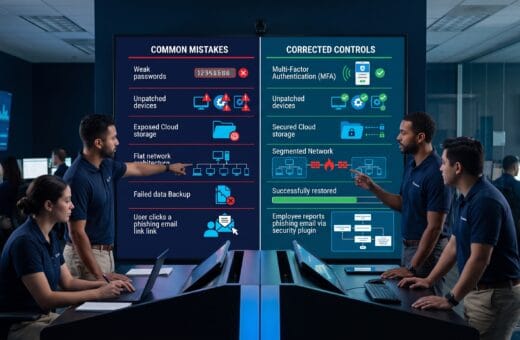
Common Cybersecurity Mistakes
1. Buying Tools Without Clear Ownership
Every control needs configuration, maintenance, monitoring, and review.
2. Treating Compliance as Complete Security
Compliance can provide a baseline, but attackers do not limit themselves to checklist requirements.
3. Ignoring Identity
Strong perimeter controls cannot compensate for compromised privileged accounts.
4. Keeping a Flat Network
Segmentation reduces the reach of an attacker.
5. Trusting Backups Without Testing
Recovery must be demonstrated.
6. Ignoring Suppliers
Third-party access and software dependencies can create major exposure.
7. Overloading Teams With Alerts
Detection should prioritize activity that requires action.
8. Failing to Exercise Incident Plans
A document that has never been tested may fail during a crisis.
Cybersecurity Solutions Checklist
Use this cybersecurity solutions checklist to review your program:
- Cybersecurity has executive ownership.
- Critical services and assets are inventoried.
- Multifactor authentication protects important accounts.
- Privileged access is limited and monitored.
- Endpoints are centrally managed.
- Email has phishing and impersonation protection.
- Vulnerabilities are prioritized and remediated.
- Secure configuration baselines are enforced.
- Networks are segmented.
- Cloud accounts are continuously reviewed.
- Sensitive data is classified and encrypted.
- Backups are protected and restoration is tested.
- Important logs are centralized.
- Alerts are investigated.
- An incident response plan exists.
- Ransomware and account-compromise playbooks are exercised.
- Employees receive relevant training.
- Critical vendors are assessed.
- Applications follow secure development practices.
- Independent security testing occurs regularly.
Frequently Asked Questions
1. What Cybersecurity Solutions Should a Small Organization Implement First?
Start with asset inventory, multifactor authentication, managed devices, automatic patching, email security, protected backups, employee awareness, and a basic incident-response plan.
2. Is Antivirus Enough for an Organization?
No. Antivirus is one control. Organizations also need identity protection, patching, secure configuration, backups, email defense, monitoring, and response capabilities.
3. What Is the Difference Between SIEM and MDR?
SIEM is a platform that collects and analyzes security data. MDR is a managed service in which security specialists monitor, investigate, and respond to threats using endpoint, identity, network, cloud, and other telemetry.
4. Does Every Organization Need Zero Trust?
Every organization can benefit from zero-trust principles such as explicit verification, least privilege, device checks, segmentation, and continuous monitoring. Implementation should match risk and resources.
5. How Often Should Incident Response Plans Be Tested?
Test them regularly and after major system, staff, supplier, or regulatory changes. High-risk organizations may run several scenario exercises each year.
6. How Much Should an Organization Spend on Cybersecurity?
There is no universal percentage. Spending should reflect business criticality, data sensitivity, threat exposure, legal obligations, technology complexity, and the potential impact of disruption.
Conclusion on Cybersecurity Solutions
Effective cybersecurity solutions form a coordinated system rather than a collection of isolated tools.
Organizations need governance, asset visibility, strong identity controls, protected endpoints, secure email, vulnerability management, network segmentation, cloud security, data protection, resilient backups, continuous monitoring, incident response, employee training, supplier oversight, and application security.
Prioritize foundational controls first. Protect the accounts and systems that matter most, maintain reliable recovery options, monitor for suspicious behavior, and exercise response plans before a real crisis.
Cybersecurity is never finished. Technology, attackers, suppliers, and business operations continue to change. Organizations that review risk continuously and improve controls systematically are better prepared to prevent disruption, contain incidents, and recover with confidence.
Also Read: “Best AI Coding Tools for Developers and Programmers“