Every company relies on digital accounts, connected devices, cloud services, email, and data. That makes cybersecurity best practices a business requirement rather than an issue reserved for large IT departments.
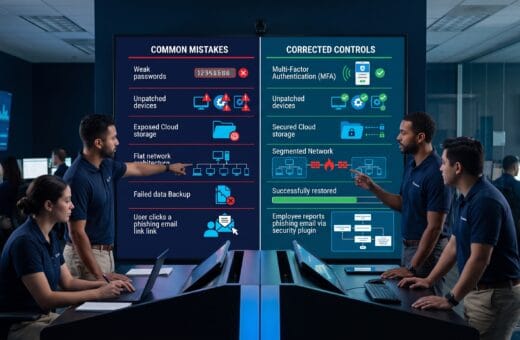
Attackers frequently target preventable weaknesses such as reused passwords, unpatched software, excessive access, exposed cloud files, fraudulent messages, and untested backups.
A small organization can reduce much of this risk by applying a consistent set of controls across people, processes, and technology.
No checklist can eliminate every threat. The goal is to make attacks harder, limit the damage when something goes wrong, detect suspicious activity earlier, and restore essential operations quickly.
The following 30 cybersecurity best practices provide a practical foundation for small businesses, growing teams, professional firms, ecommerce companies, and larger organizations.
Why Cybersecurity Best Practices Matter
Security incidents can interrupt:
- Sales
- Customer service
- Payroll
- Production
- Internal communication
- Access to critical information
- Supplier and partner operations
They may also expose confidential data and create financial, contractual, regulatory, insurance, and reputational consequences.
A balanced security program combines:
- Governance and accountability
- Identity and access management
- Secure devices and networks
- Employee awareness
- Data protection and backups
- Vendor oversight
- Monitoring and incident response
Strong security does not depend on one product. It depends on several layers working together.
30 Cybersecurity Best Practices Every Business Should Follow
1. Assign Clear Cybersecurity Ownership
Designate one accountable leader for the security program, even when technical work is outsourced.
Ownership should include:
- Risk reviews
- Policy approval
- Vendor coordination
- Incident escalation
- Progress reporting
- Budget recommendations
Security tasks often fail when everyone assumes someone else is responsible.
Document who owns each critical control and who serves as the backup.
2. Identify Critical Systems and Data
Create an inventory of the systems, accounts, devices, applications, and information the business depends on.
Important assets may include:
- Customer records
- Employee files
- Payment data
- Intellectual property
- Financial systems
- Credentials
- Operational documents
- Cloud storage
- Websites and domains
You cannot protect assets that the organization has not identified.
3. Perform Regular Risk Assessments
Review likely threats, vulnerable assets, business impact, and existing controls at least annually and after major operational changes.
Prioritize risks according to:
- Likelihood
- Potential business impact
- Existing protection
- Recovery difficulty
- Legal or contractual obligations
A short risk register with owners, deadlines, and treatment plans is more useful than a report that is never updated.
4. Create Practical Security Policies
Document clear rules covering:
- Passwords
- Device use
- Remote work
- Data handling
- Software installation
- Account access
- Incident reporting
- Acceptable use
- File sharing
- Third-party access
Policies should be understandable to employees and connected to real workflows.
Avoid publishing rules the organization cannot enforce.
5. Use Multi-Factor Authentication
Require multi-factor authentication for:
- Business email
- Cloud administration
- Financial systems
- Remote access
- Password managers
- Customer databases
- Social media administration
- Domain and website accounts
Prefer phishing-resistant methods such as hardware security keys or passkeys where practical.
App-based verification is generally stronger than relying only on text messages.
6. Use a Business Password Manager
Provide an approved password manager so employees can create and store unique passwords without relying on insecure spreadsheets, notes, or repeated credentials.
Set standards for:
- Strong master passwords
- Account recovery
- Shared vaults
- Emergency access
- Former employee removal
- Administrative ownership
A managed password system is one of the most practical cybersecurity best practices for reducing account compromise.
7. Eliminate Shared User Accounts
Give each employee an individual account wherever possible.
Shared accounts weaken accountability and make access removal difficult.
When a shared operational credential is unavoidable:
- Store it in a managed vault.
- Restrict authorized users.
- Record access.
- Rotate the credential regularly.
- Remove access when responsibilities change.
8. Apply Least-Privilege Access
Give employees, contractors, and applications only the access required for their responsibilities.
Review permissions regularly and remove access that is no longer needed.
Administrative accounts should not be used for routine:
- Browsing
- Document work
- Messaging
- General collaboration
Limiting privileges reduces the damage caused by compromised accounts and employee mistakes.
9. Review Access When Roles Change
Build security checks into:
- Employee onboarding
- Transfers
- Promotions
- Extended leave
- Contractor completion
- Employee offboarding
Disable accounts promptly, recover company devices, rotate shared credentials, transfer file ownership, and confirm that third-party access has been removed.
10. Patch Operating Systems and Software
Install security updates promptly across:
- Computers
- Servers
- Mobile devices
- Network equipment
- Browsers
- Plugins
- Cloud applications
- Business software
Enable automatic updates where appropriate and track systems requiring manual maintenance.
Unsupported software should be upgraded, isolated, or retired.
11. Maintain an Accurate Device Inventory
Track company laptops, desktops, phones, tablets, servers, network equipment, and authorized personal devices.
Record:
- Assigned user
- Device type
- Operating system
- Security status
- Serial number
- Purchase date
- Disposal date
Unknown devices create unknown risk.
12. Protect Endpoints
Use centrally managed endpoint protection to detect:
- Malware
- Suspicious behavior
- Unauthorized applications
- Risky configurations
- Potential ransomware activity
- Unusual network connections
Keep protection enabled and current.
Alerts should be reviewed by someone authorized to isolate or investigate a compromised device.
13. Encrypt Business Devices
Enable full-disk encryption on laptops, phones, tablets, and other portable systems containing business data.
Encryption reduces exposure when a device is lost or stolen.
Store recovery keys securely and test the recovery process before an emergency occurs.
14. Configure Automatic Screen Locking
Require devices to lock after a short period of inactivity and demand authentication when the user returns.
Employees should also lock screens whenever they leave:
- A shared office
- A meeting room
- A public workspace
- A customer location
- A vehicle or travel environment
15. Secure Wi-Fi and Network Equipment
Replace default administrator credentials and use modern wireless encryption.
Businesses should also:
- Update router and firewall firmware.
- Disable unnecessary remote administration.
- Separate guest access from business systems.
- Restrict network administration.
- Document important configurations.
- Remove unused services.
16. Segment Important Systems
Separate sensitive systems from general network traffic when practical.
Consider separating:
- Payment environments
- Backups
- Guest Wi-Fi
- Servers
- Operational devices
- Internet-connected equipment
- Development environments
Segmentation can prevent one compromised device from exposing the entire organization.
17. Filter Email and Web Threats
Use technical controls to reduce phishing, fraudulent websites, and malware exposure.
Useful protections include:
- Spam filtering
- Malicious-link analysis
- Attachment scanning
- Domain authentication
- Browser protection
- Website filtering
- Impersonation detection
Technical controls are not perfect, so employees still need an easy way to report suspicious messages.
18. Train Employees to Recognize Social Engineering
Provide short, recurring training on:
- Phishing
- Executive impersonation
- Fraudulent payment requests
- Credential theft
- Malicious QR codes
- Fake technical-support calls
- Deepfake-enabled scams
- Suspicious file-sharing requests
Training should explain what employees must do, not only what attackers may attempt.
Also Read: Cybersecurity Threats 2025: Beware of the Hackers’ New Trap!
19. Verify Sensitive Requests Through Another Channel
Require independent verification for:
- Bank instruction changes
- Large payments
- Payroll updates
- Password resets
- Sensitive data requests
- Supplier account changes
- Unusual executive instructions
Use a known phone number or approved internal channel rather than replying to the original message.
20. Restrict Software Installation
Allow only approved software and browser extensions on company systems.
Unauthorized tools can:
- Introduce malware
- Leak company data
- Create licensing issues
- Bypass security controls
- Add unapproved cloud storage
- Expose customer information
Maintain a simple process through which employees can request legitimate applications.
21. Secure Cloud Services
Configure cloud accounts deliberately instead of accepting every default setting.
Important controls include:
- Multi-factor authentication
- Restricted public sharing
- Administrator role reviews
- Logging
- External collaborator reviews
- Application integration reviews
- API-key protection
- Inactive account removal
Cloud security remains one of the most important modern cybersecurity best practices because cloud permissions can expose large amounts of information quickly.
22. Protect Sensitive Data
Collect only the information the business genuinely needs and retain it only as long as necessary.
Protect important data using:
- Encryption
- Access controls
- Approved storage locations
- Secure transfer methods
- Retention schedules
- Disposal procedures
- Activity monitoring
Avoid sending sensitive information through personal accounts or unapproved communication channels.
23. Back Up Critical Information
Maintain regular backups of:
- Business files
- Databases
- Website content
- System configurations
- Financial information
- Customer records
- Operational documents
Use the 3-2-1 principle as a practical guide:
- Keep multiple copies of important information.
- Use more than one storage type.
- Maintain at least one copy that is offline, immutable, or separated from production systems.
24. Test Backup Restoration
A completed backup job does not prove the business can recover.
Test restoration regularly and confirm:
- Files can be opened.
- Databases remain usable.
- Recovery credentials are available.
- The correct employees can begin restoration.
- Recovery time meets business needs.
- Backups have not been modified by an attacker.
Tested restoration is one of the most valuable cybersecurity best practices for limiting ransomware and system-failure damage.
25. Manage Vendor and Supply-Chain Risk
Review the security of:
- Cloud providers
- Payment processors
- Software suppliers
- Consultants
- Managed service providers
- Contractors
- Fulfillment partners
- Data-processing vendors
Contracts should address:
- Security responsibilities
- Breach notification
- Data return or deletion
- Subcontractors
- Access termination
- Compliance obligations
- Service continuity
26. Monitor Logs and Security Alerts
Collect and review logs from important systems, cloud services, identity platforms, endpoints, and network tools.
Define which alerts require immediate action.
A monitoring system provides little value when warnings are ignored or routed to an unattended inbox.
27. Create an Incident Response Plan
Document how the organization will:
- Identify an incident.
- Contain the threat.
- Preserve relevant information.
- Investigate what happened.
- Communicate internally and externally.
- Restore systems.
- Learn from the event.
Include contacts for:
- Leadership
- IT
- Legal counsel
- Insurance
- Communications
- Critical vendors
- Relevant authorities
Keep a copy available when normal systems cannot be accessed.
28. Practice Incident Scenarios
Run tabletop exercises covering:
- Ransomware
- Account takeover
- Lost devices
- Fraudulent payments
- Data exposure
- Website compromise
- Cloud outages
- Vendor breaches
Exercises reveal unclear responsibilities, missing contact details, weak decisions, and recovery dependencies before a real emergency.
Also Read: Scared of Malware? Here’s How to Detect and Remove Malware!
29. Prepare Business Continuity Procedures
Identify:
- Essential services
- Acceptable downtime
- Recovery priorities
- Manual workarounds
- Alternative suppliers
- Emergency communication methods
- Critical staff responsibilities
Cybersecurity is not only about stopping intrusions. It is also about maintaining or restoring business operations safely.
30. Review and Improve the Security Program
Track:
- Security incidents
- Audit findings
- Training completion
- Patching status
- Access reviews
- Backup tests
- Vendor risks
- Overdue actions
- Exercise findings
Update controls as the business changes.
The best cybersecurity best practices become a recurring management process rather than a one-time project.
Cybersecurity Best Practices Priority Table
| Priority | Actions | Target Timing |
|---|---|---|
| Immediate | MFA, patching, backups, account removal, endpoint protection | First 30 days |
| High | Access reviews, staff training, cloud audits, incident plan | Within 60 days |
| Foundational | Risk assessment, policies, inventories, vendor reviews | Within 90 days |
| Ongoing | Monitoring, exercises, restoration tests, program reviews | Quarterly or scheduled |
How to Implement These Cybersecurity Best Practices
1. Start With the Highest-Risk Gaps
Do not wait to design a perfect program.
Begin with controls that reduce common and severe risks:
- Multi-factor authentication
- Prompt patching
- Reliable backups
- Endpoint protection
- Account management
- Phishing-resistant procedures
2. Assign an Owner and Deadline
Every action should have:
- One accountable owner
- A completion date
- A defined result
- Evidence the control works
- A review schedule
3. Use Managed Services When Appropriate
Smaller companies may use qualified external providers for:
- Security monitoring
- Cloud administration
- Backups
- Assessments
- Endpoint management
- Incident response
Outsourcing technical work does not outsource management responsibility.
4. Measure Results
Useful cybersecurity measures include:
- Patch compliance
- Multi-factor authentication coverage
- Backup restoration success
- Overdue access reviews
- Training completion
- Reported phishing messages
- Incident response exercise findings
- Time required to disable former employee access
Common Cybersecurity Mistakes
Businesses often weaken security by:
- Treating security as an IT-only responsibility
- Buying tools without assigning ownership
- Allowing permanent administrative access
- Keeping former employee accounts active
- Assuming cloud providers configure every setting securely
- Backing up data without testing restoration
- Using annual training as the only employee control
- Ignoring vendor access
- Failing to practice incident decisions
- Hiding security problems instead of reporting them early
These mistakes are usually preventable through clear ownership and consistent review.
Cybersecurity Best Practices Checklist
Use this checklist to assess the organization:
- Security ownership is assigned.
- Critical systems and data are inventoried.
- Multi-factor authentication protects important accounts.
- A business password manager is approved.
- Shared and inactive accounts are controlled.
- Administrative access is restricted.
- Software is patched promptly.
- Business devices are encrypted and protected.
- Employees receive recurring security training.
- Sensitive financial requests require verification.
- Cloud permissions are reviewed.
- Critical data is backed up.
- Backup restoration is tested.
- Vendors with system or data access are assessed.
- Logs and alerts are monitored.
- Incident response and continuity plans are exercised.
Also Read: The Digital Detective’s Kit: Technology for Unmasking Cyber Evidence
Frequently Asked Questions
1. What Are the Most Important Cybersecurity Best Practices for a Small Business?
Start with:
- Multi-factor authentication
- Unique passwords stored in a password manager
- Prompt security updates
- Endpoint protection
- Tested backups
- Restricted access
- Employee phishing awareness
- An incident response plan
These controls address several common causes of business security incidents.
2. How Often Should Cybersecurity Training Be Conducted?
Provide training during onboarding and reinforce it throughout the year with short updates, realistic scenarios, and reminders.
Important new threats or process changes should be communicated promptly.
3. How Often Should Access Be Reviewed?
Review important privileges at least quarterly and whenever an employee, contractor, or vendor changes roles or leaves.
Highly sensitive systems may require more frequent reviews.
4. Are Cloud Backups Enough?
Cloud backups can be useful, but businesses should confirm:
- Separation from production accounts
- Retention periods
- Immutability
- Recovery permissions
- Restoration performance
- Protection against unauthorized deletion
One synchronized cloud folder is not a complete backup strategy.
5. What Should Employees Do After Clicking a Suspicious Link?
They should report the event immediately through the approved process.
They should also:
- Avoid entering additional credentials.
- Disconnect the device when instructed.
- Stop using affected accounts.
- Follow guidance from the security or IT contact.
- Provide accurate details about what happened.
Fast reporting can significantly limit damage.
6. Does a Small Business Need an Incident Response Plan?
Yes.
The plan can be concise, but it should identify:
- Decision-makers
- Technical contacts
- Communication responsibilities
- Recovery priorities
- Legal or insurance contacts
- Steps for common scenarios
Conclusion
Applying these 30 cybersecurity best practices creates a practical defense across accounts, devices, employees, data, cloud services, vendors, and business operations.
Begin with the controls that address the largest risks, assign clear ownership, test whether protections work, and improve the program as the organization changes.
Security is strongest when it becomes part of normal management rather than a reaction after an incident.
Consistent preparation cannot guarantee that an attack will never occur. It can make successful attacks less likely, reduce their impact, and help the business recover with greater speed and confidence.
Also Read: “Best Cybersecurity Tools for Businesses in 2026“